IEIndustrial Automation & Embedded
Benchtop Bioprocess Automation & Sample Monitoring System
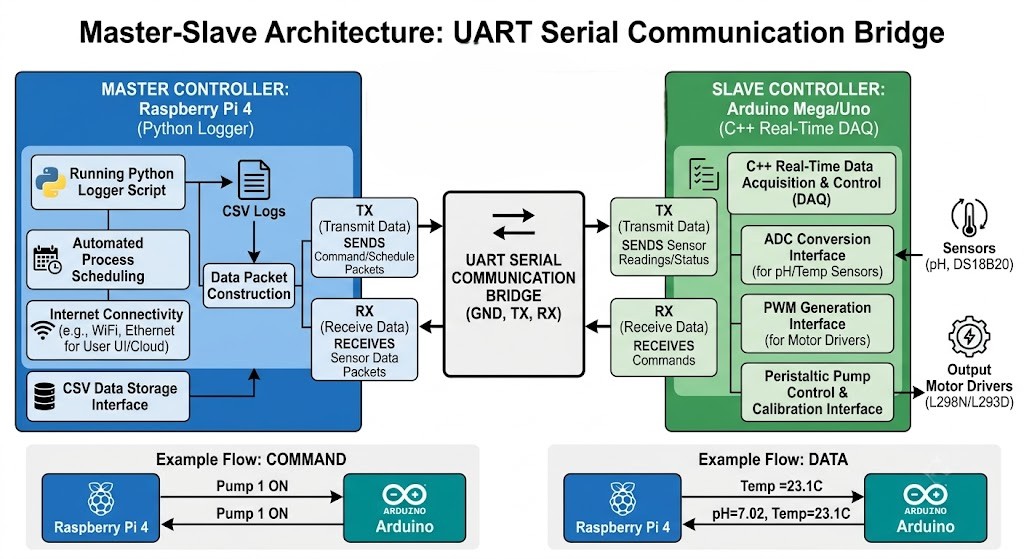
A master-slave benchtop system mimicking commercial continuous-culture platforms — a Raspberry Pi orchestrates and logs while an Arduino handles real-time sensor polling and peristaltic-pump actuation, all housed in custom Fusion 360 enclosures.
Hardware & Architecture
- Supervisory master: Raspberry Pi 4 running Python for serial comms, timestamped CSV logging, and process scheduling.
- Real-time slave: Arduino handling pH ADC reads, OneWire DS18B20 temperature probes, and PWM for motor drivers.
- L298N/L293D motor drivers controlling 12V peristaltic pumps with calibratable flow rates.
- Fusion 360 watertight enclosure, modular probe mounts, and integrated pump housing for a wet-lab environment.
Key Highlights
- Isolates high-level software logic from timing-critical hardware tasks for reliable multi-day runs.
- Arduino transmits comma-separated telemetry at 1 Hz; the Pi parses, logs, and runs a pH feedback loop.
- Automated dosing: the Pi actuates the pump when pH drops below threshold and stops it once stabilized.
Images

Code
bioprocess_arduino_slave.inoArduino Subordinate Processorcpp
#include <OneWire.h>
#include <DallasTemperature.h>

// --- Hardware Pins ---
const int pHPin = A0;
const int tempPin = 2; // DS18B20 Data pin
const int pumpPWM = 5;
const int pumpDir = 6;

// --- Sensor Setup ---
OneWire oneWire(tempPin);
DallasTemperature sensors(&oneWire);

// --- Variables ---
float calibration_value = 21.34; // pH calibration constant
int pumpSpeed = 0; // 0-255 PWM

void setup() {
  Serial.begin(115200);
  sensors.begin();
  pinMode(pumpPWM, OUTPUT);
  pinMode(pumpDir, OUTPUT);
  digitalWrite(pumpDir, HIGH); // Set default pump direction
}

void loop() {
  // 1. Read Commands from Raspberry Pi
  if (Serial.available() > 0) {
    String command = Serial.readStringUntil('\n');
    command.trim();
    // Command format: "PUMP:150"
    if (command.startsWith("PUMP:")) {
      String speedStr = command.substring(5);
      pumpSpeed = speedStr.toInt();
      analogWrite(pumpPWM, pumpSpeed);
    }
  }

  // 2. Read Sensors
  sensors.requestTemperatures();
  float temperature = sensors.getTempCByIndex(0);
  int sensorValue = analogRead(pHPin);
  float voltage = sensorValue * (5.0 / 1023.0);
  float pHValue = 3.5 * voltage + calibration_value; // Standard linear pH conversion

  // 3. Transmit Data to Raspberry Pi
  // Format: "TEMP:24.5,PH:7.2,PUMP:150"
  Serial.print("TEMP:");
  Serial.print(temperature);
  Serial.print(",PH:");
  Serial.print(pHValue);
  Serial.print(",PUMP:");
  Serial.println(pumpSpeed);
  delay(1000); // 1 Hz polling rate
}bioprocess_pi_logger.pyRaspberry Pi Logger & Controllerpython
import serial
import time
import csv
from datetime import datetime

# --- Configuration ---
# Update with the correct Arduino USB port (e.g., /dev/ttyACM0 or /dev/ttyUSB0)
SERIAL_PORT = '/dev/ttyACM0'
BAUD_RATE = 115200
LOG_FILE = 'bioprocess_data_log.csv'

# Thresholds for automated actuation
TARGET_PH_MIN = 6.5
PUMP_DOSING_SPEED = "150"  # PWM value


def setup_csv():
    """Initializes the CSV file with headers for statistical tracking."""
    with open(LOG_FILE, mode='w', newline='') as file:
        writer = csv.writer(file)
        writer.writerow(['Timestamp', 'Temperature_C', 'pH_Level', 'Pump_PWM'])


def parse_data(serial_line):
    """Parses the comma-separated string from the Arduino."""
    try:
        parts = serial_line.split(',')
        temp = float(parts[0].split(':')[1])
        ph = float(parts[1].split(':')[1])
        pump = int(parts[2].split(':')[1])
        return temp, ph, pump
    except (IndexError, ValueError) as e:
        print(f"[ERROR] Corrupt data received: {serial_line} -> {e}")
        return None, None, None


def main():
    setup_csv()
    print("[SYSTEM] Starting Continuous Benchtop Monitoring...")
    try:
        # Establish serial connection
        ser = serial.Serial(SERIAL_PORT, BAUD_RATE, timeout=2)
        time.sleep(2)  # Allow Arduino to reset upon serial connection
        while True:
            if ser.in_waiting > 0:
                raw_data = ser.readline().decode('utf-8').strip()
                temp, ph, pump = parse_data(raw_data)
                if temp is not None:
                    # 1. Log Data
                    timestamp = datetime.now().strftime('%Y-%m-%d %H:%M:%S')
                    with open(LOG_FILE, mode='a', newline='') as file:
                        writer = csv.writer(file)
                        writer.writerow([timestamp, temp, ph, pump])
                    print(f"[{timestamp}] Temp: {temp}C | pH: {ph} | Pump PWM: {pump}")

                    # 2. Automated Logic (Feedback Loop)
                    # If pH is too low, actuate pump to dose base solution
                    if ph < TARGET_PH_MIN and pump == 0:
                        print(f"[ALERT] pH below {TARGET_PH_MIN}. Initiating dosing pump.")
                        command = f"PUMP:{PUMP_DOSING_SPEED}\n"
                        ser.write(command.encode('utf-8'))
                    # If pH recovers, stop the pump
                    elif ph >= TARGET_PH_MIN and pump > 0:
                        print("[INFO] pH stabilized. Stopping dosing pump.")
                        ser.write(b"PUMP:0\n")
    except serial.SerialException as e:
        print(f"[FATAL] Serial Connection Error: {e}")
    except KeyboardInterrupt:
        print("\n[SYSTEM] Manual override triggered. Stopping monitoring.")
        if 'ser' in locals() and ser.is_open:
            ser.write(b"PUMP:0\n")  # Ensure pump is off before exiting
            ser.close()


if __name__ == '__main__':
    main()