IEIndustrial Automation & Embedded
Smart Library RC Car Assistant
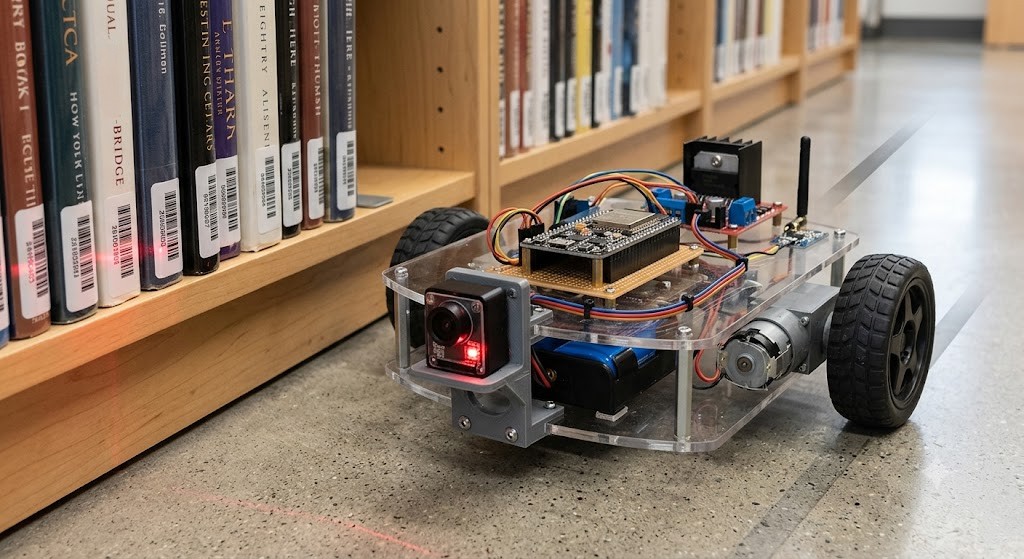
A teleoperated NodeMCU rover that scans book ISBNs with a TTL barcode scanner and queries a Python/Flask mock database over a REST API to return shelving coordinates.
Hardware & Architecture
- NodeMCU (ESP8266/ESP32) handling differential-drive motor control, Wi-Fi, and serial comms.
- L298N dual H-bridge driving 2–4 DC gear motors for differential-drive kinematics.
- UART/TTL barcode scanner (e.g., GM65) for high-speed ISBN capture.
- Python backend hosting a mock relational database mapping barcodes to physical shelf locations.
Key Highlights
- Distributed architecture splits work between the embedded edge node and a centralized backend.
- Onboard web server exposes a simple RC control pad; scanned ISBNs are forwarded to the backend over an HTTP REST call.
- Flask backend returns shelving coordinates (Aisle, Shelf, Row) or flags unknown books for manual sorting.
Images

Code
library_car.inoNodeMCU Rover Firmwarecpp
#include <ESP8266WiFi.h>
#include <ESP8266HTTPClient.h>
#include <WiFiClient.h>
#include <SoftwareSerial.h>

// --- Network Configuration ---
const char* ssid = "YOUR_WIFI_SSID";
const char* password = "YOUR_WIFI_PASSWORD";
const String serverName = "http://192.168.1.100:5000/api/scan"; // Update to your PC's IP

// --- Hardware Pins ---
// Motor A (Left)
const int enA = 14; // D5
const int in1 = 12; // D6
const int in2 = 13; // D7
// Motor B (Right)
const int enB = 0;  // D3
const int in3 = 2;  // D4
const int in4 = 15; // D8

// Barcode Scanner (Software Serial keeps Hardware TX/RX free for debugging)
SoftwareSerial barcodeScanner(4, 5); // RX (D2), TX (D1)

WiFiServer server(80);
String header;

void setup() {
  Serial.begin(115200);
  barcodeScanner.begin(9600);
  // Initialize Motor Pins
  pinMode(enA, OUTPUT);
  pinMode(enB, OUTPUT);
  pinMode(in1, OUTPUT);
  pinMode(in2, OUTPUT);
  pinMode(in3, OUTPUT);
  pinMode(in4, OUTPUT);
  // Connect to Wi-Fi
  Serial.print("Connecting to ");
  Serial.println(ssid);
  WiFi.begin(ssid, password);
  while (WiFi.status() != WL_CONNECTED) {
    delay(500);
    Serial.print(".");
  }
  Serial.println("\nWiFi connected.");
  Serial.println("IP address: ");
  Serial.println(WiFi.localIP());
  server.begin();
}

void loop() {
  // 1. Handle Barcode Scanning
  if (barcodeScanner.available()) {
    String barcodeData = barcodeScanner.readStringUntil('\n');
    barcodeData.trim(); // Remove whitespace/newline
    if (barcodeData.length() > 0) {
      Serial.println("Scanned Barcode: " + barcodeData);
      sendToDatabase(barcodeData);
    }
  }

  // 2. Handle RC Teleoperation (Simple Web Server)
  WiFiClient client = server.available();
  if (client) {
    String currentLine = "";
    while (client.connected()) {
      if (client.available()) {
        char c = client.read();
        header += c;
        if (c == '\n') {
          if (currentLine.length() == 0) {
            // HTTP response
            client.println("HTTP/1.1 200 OK");
            client.println("Content-type:text/html");
            client.println("Connection: close");
            client.println();
            // RC Commands parsed from URL
            if (header.indexOf("GET /forward") >= 0) moveForward();
            else if (header.indexOf("GET /backward") >= 0) moveBackward();
            else if (header.indexOf("GET /left") >= 0) turnLeft();
            else if (header.indexOf("GET /right") >= 0) turnRight();
            else if (header.indexOf("GET /stop") >= 0) stopMotors();
            // Simple HTML Control Pad
            client.println("<!DOCTYPE html><html><body><h1>RC Library Car</h1>");
            client.println("<p><a href=\"/forward\"><button>Forward</button></a></p>");
            client.println("<p><a href=\"/left\"><button>Left</button></a>");
            client.println("<a href=\"/stop\"><button>Stop</button></a>");
            client.println("<a href=\"/right\"><button>Right</button></a></p>");
            client.println("<p><a href=\"/backward\"><button>Backward</button></a></p>");
            client.println("</body></html>");
            client.println();
            break;
          } else {
            currentLine = "";
          }
        } else if (c != '\r') {
          currentLine += c;
        }
      }
    }
    header = "";
    client.stop();
  }
}

// --- Helper Functions ---
void sendToDatabase(String barcode) {
  if (WiFi.status() == WL_CONNECTED) {
    WiFiClient client;
    HTTPClient http;
    // Construct REST Payload
    String serverPath = serverName + "?barcode=" + barcode;
    http.begin(client, serverPath.c_str());
    int httpResponseCode = http.GET();
    if (httpResponseCode > 0) {
      Serial.print("HTTP Response code: ");
      Serial.println(httpResponseCode);
      String payload = http.getString();
      Serial.println("Database Reply: " + payload);
    } else {
      Serial.print("Error code: ");
      Serial.println(httpResponseCode);
    }
    http.end();
  }
}

// Kinematics Control Logic
void moveForward() {
  digitalWrite(in1, HIGH); digitalWrite(in2, LOW);
  digitalWrite(in3, HIGH); digitalWrite(in4, LOW);
  analogWrite(enA, 200); analogWrite(enB, 200);
}
void moveBackward() {
  digitalWrite(in1, LOW); digitalWrite(in2, HIGH);
  digitalWrite(in3, LOW); digitalWrite(in4, HIGH);
  analogWrite(enA, 200); analogWrite(enB, 200);
}
void turnLeft() {
  digitalWrite(in1, LOW); digitalWrite(in2, HIGH);
  digitalWrite(in3, HIGH); digitalWrite(in4, LOW);
  analogWrite(enA, 150); analogWrite(enB, 150);
}
void turnRight() {
  digitalWrite(in1, HIGH); digitalWrite(in2, LOW);
  digitalWrite(in3, LOW); digitalWrite(in4, HIGH);
  analogWrite(enA, 150); analogWrite(enB, 150);
}
void stopMotors() {
  digitalWrite(in1, LOW); digitalWrite(in2, LOW);
  digitalWrite(in3, LOW); digitalWrite(in4, LOW);
  analogWrite(enA, 0); analogWrite(enB, 0);
}library_server.pyFlask Mock Databasepython
from flask import Flask, request, jsonify

app = Flask(__name__)

# Mock Relational Database (Barcode -> Book Metadata & Location)
library_db = {
    "9780134685991": {
        "title": "Modern Robotics",
        "author": "Kevin M. Lynch",
        "location": "Aisle 3, Shelf B, Row 2"
    },
    "9780262033848": {
        "title": "Introduction to Algorithms",
        "author": "Thomas H. Cormen",
        "location": "Aisle 1, Shelf A, Row 5"
    },
    "1234567890123": {
        "title": "Embedded Systems Design",
        "author": "Steve Heath",
        "location": "Aisle 4, Shelf C, Row 1"
    }
}


@app.route('/api/scan', methods=['GET'])
def handle_scan():
    barcode = request.args.get('barcode')
    if not barcode:
        return jsonify({"error": "No barcode provided"}), 400
    print(f"[SYSTEM] Received Scan Request for Barcode: {barcode}")
    if barcode in library_db:
        book_info = library_db[barcode]
        print(f"[SUCCESS] Match Found: {book_info['title']} -> {book_info['location']}")
        return jsonify({
            "status": "success",
            "data": book_info
        }), 200
    else:
        print("[WARNING] Barcode not recognized in current database.")
        return jsonify({
            "status": "error",
            "message": "Book not found in database. Requires manual sorting."
        }), 404


if __name__ == '__main__':
    # Run on 0.0.0.0 to allow incoming connections from the NodeMCU on the local network
    app.run(host='0.0.0.0', port=5000, debug=True)